Pocket Shack

The premier AllStarLink app for iPhone, Mac and Apple Watch

Pocket Shack puts the AllStarLink network in your pocket. Connect to amateur radio repeaters and hubs around the world, listen to what's happening, and talk with a tap, from your iPhone, Mac or Apple Watch.

Download on the App Store

Free for iPhone, iPad, Mac and Apple Watch. Not yet available in the EU or mainland China.

  • iPhone
  • iPad
  • Mac
  • Apple Watch
  • CarPlay
  • Listen for free
  • Listens in the background
  • Private by design
  • Accessibility

What it does

Pocket Shack: Connect to any node

Connect to any node

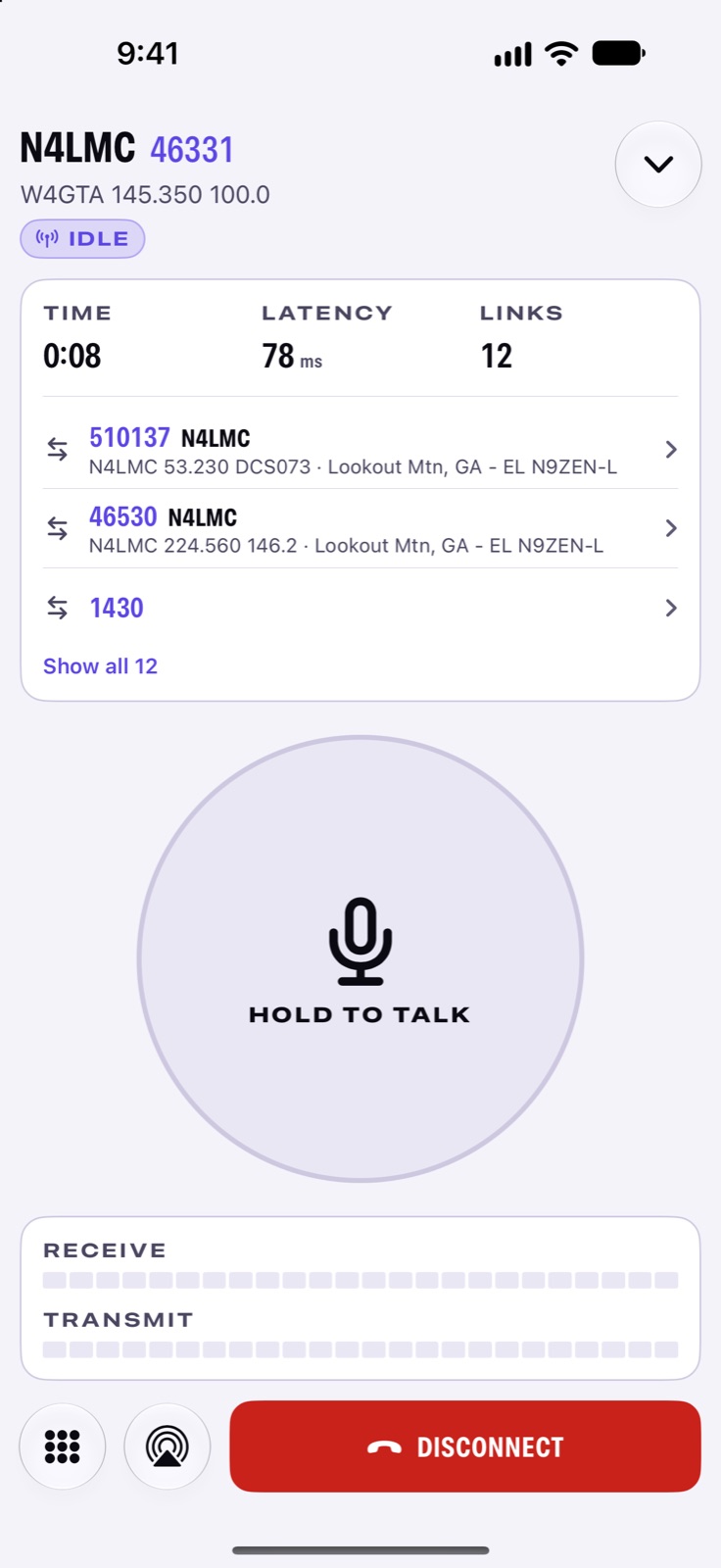
Connect to any AllStarLink node that allows app connections, with clear audio and a live session clock.

More with Pro
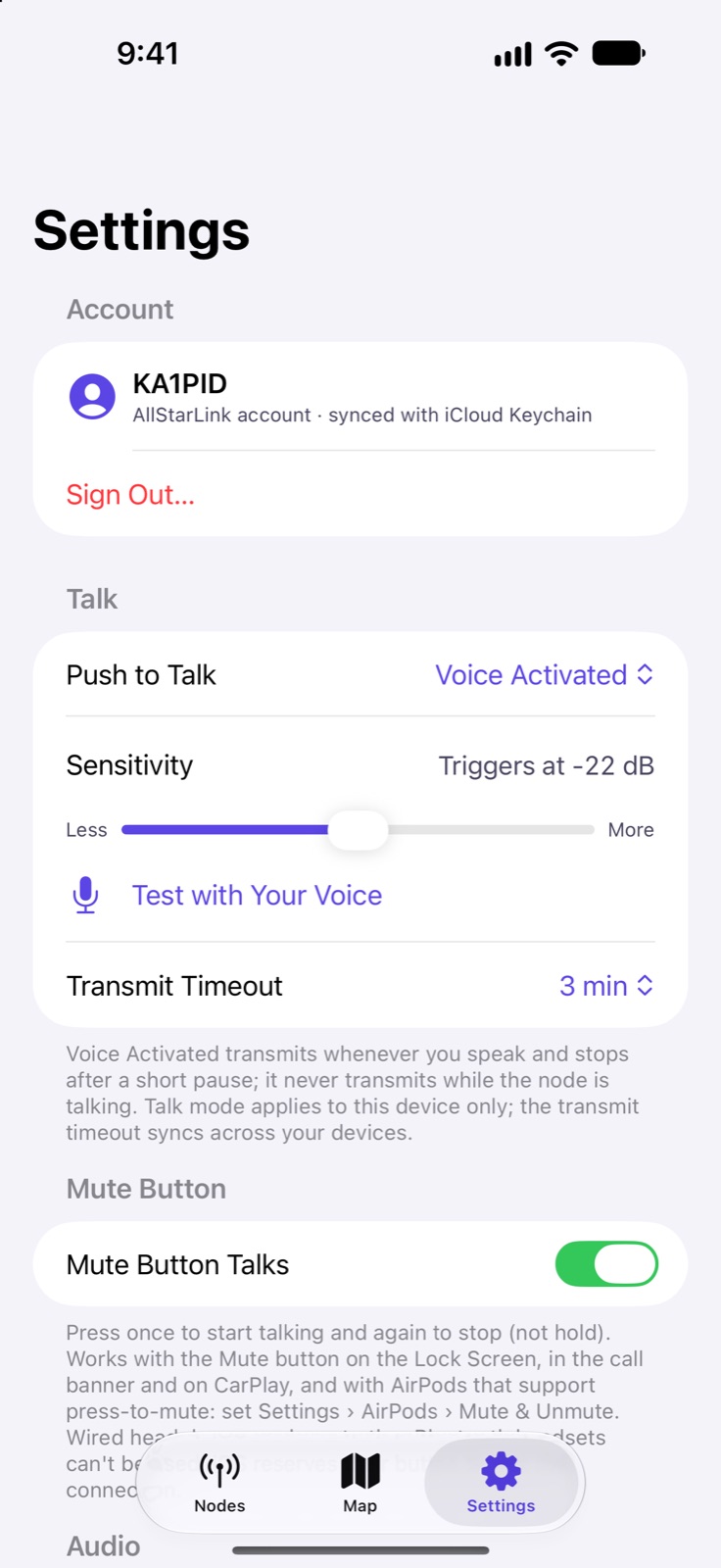
Pocket Shack: Push to talk

Push to talk

Hold to talk, tap to toggle, or go hands-free with voice activation and a live sensitivity meter.

Pro
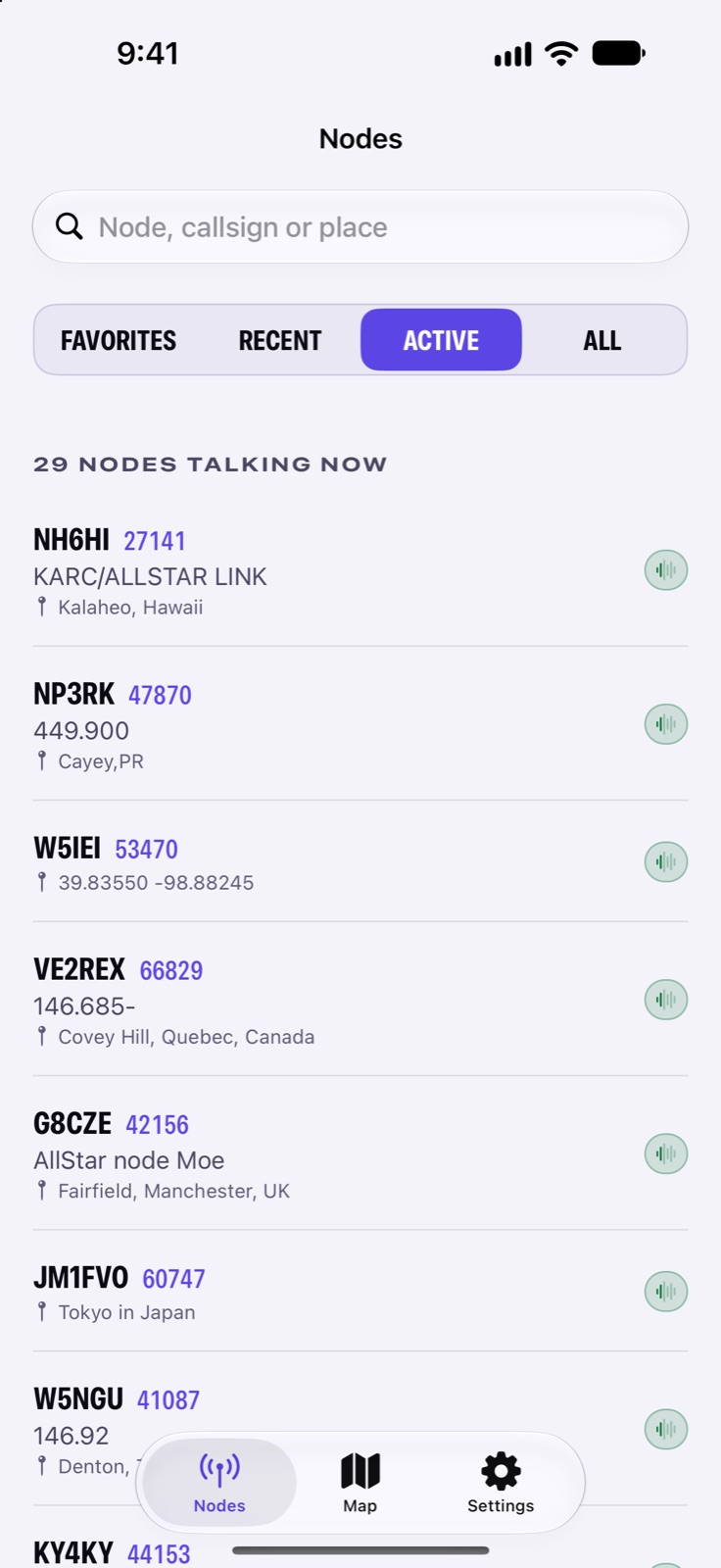
Pocket Shack: Who is on the air

Who is on the air

See which nodes are on the air right now and jump in.
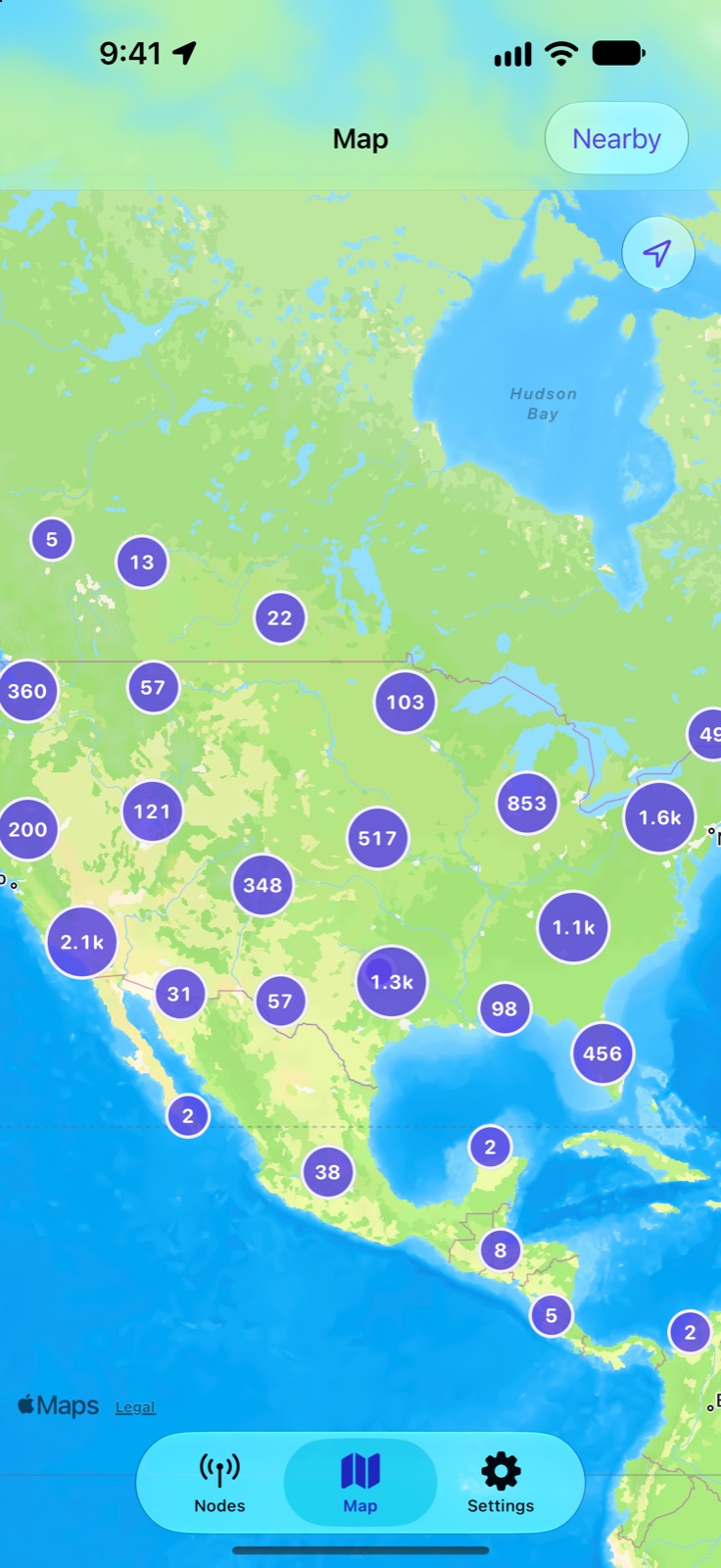
Pocket Shack: Node map and nearby

Node map and nearby

Browse every node on a map, or list the ones nearest you.
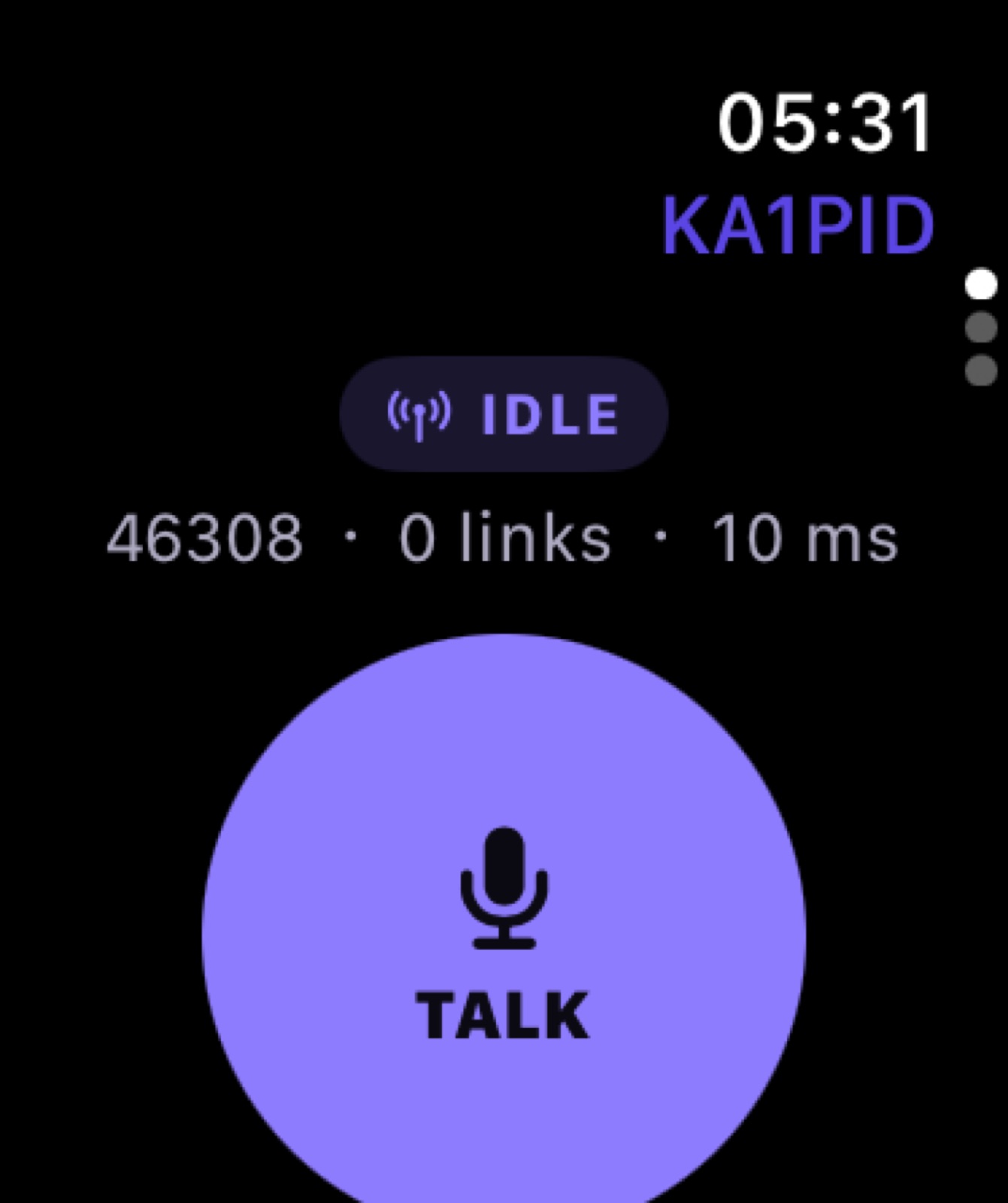
Pocket Shack: Apple Watch remote

Apple Watch remote

Run your connection from your wrist: pick a favorite, hold to talk, and see when it's busy, with your iPhone in your pocket.

More with Pro

Features

Made for operators

31 things Pocket Shack does, grouped by what you're trying to do.

Talk and listen

10 features
  • Listen for free

    Listen to any node free, with no microphone needed. Monitor-only connections never transmit.

  • Never talk over anyone

    Never talk over anyone: Pocket Shack shows when the node has the channel and waits for it.

    Pro
  • Even out volume
  • Who's talking
  • Transmit timerPro
  • Mic gain with a meterPro
  • Echo cancellationPro
  • Courtesy tone
  • Heard list
  • Mute button talksPro
What these do
Even out volume
Quiet and loud stations play at a similar volume, so you don't have to ride the volume between speakers. Turn it off for the raw node audio.
Who's talking
See which node keyed up, with its callsign and location, on the connection screen, Lock Screen, Apple Watch and CarPlay.
Transmit timer
A transmit timer with a countdown keeps you from timing out the repeater.
Mic gain with a meter
Mic gain with a level meter tells you if you sound too quiet, just right, or too hot.
Echo cancellation
Voice processing cancels echo and evens out your level; turn it off for raw audio with a headset.
Courtesy tone
An optional local beep when another station stops talking, for nodes that don't send their own.
Heard list
A list of the nodes heard on this connection, with the time each was last heard.
Mute button talks
Use the call Mute control on the Lock Screen, in CarPlay or on AirPods to start and stop talking.

Find someone to talk to

6 features
  • Favorites

    Keep the nodes you use most a tap away, in your order, with a live talking or idle badge.
    Pocket Shack: Favorites
  • Directory search

    Search the full node directory by number, callsign or place, even offline.

  • Live node details

    Live node details: who it's linked to, its frequency, location and activity.

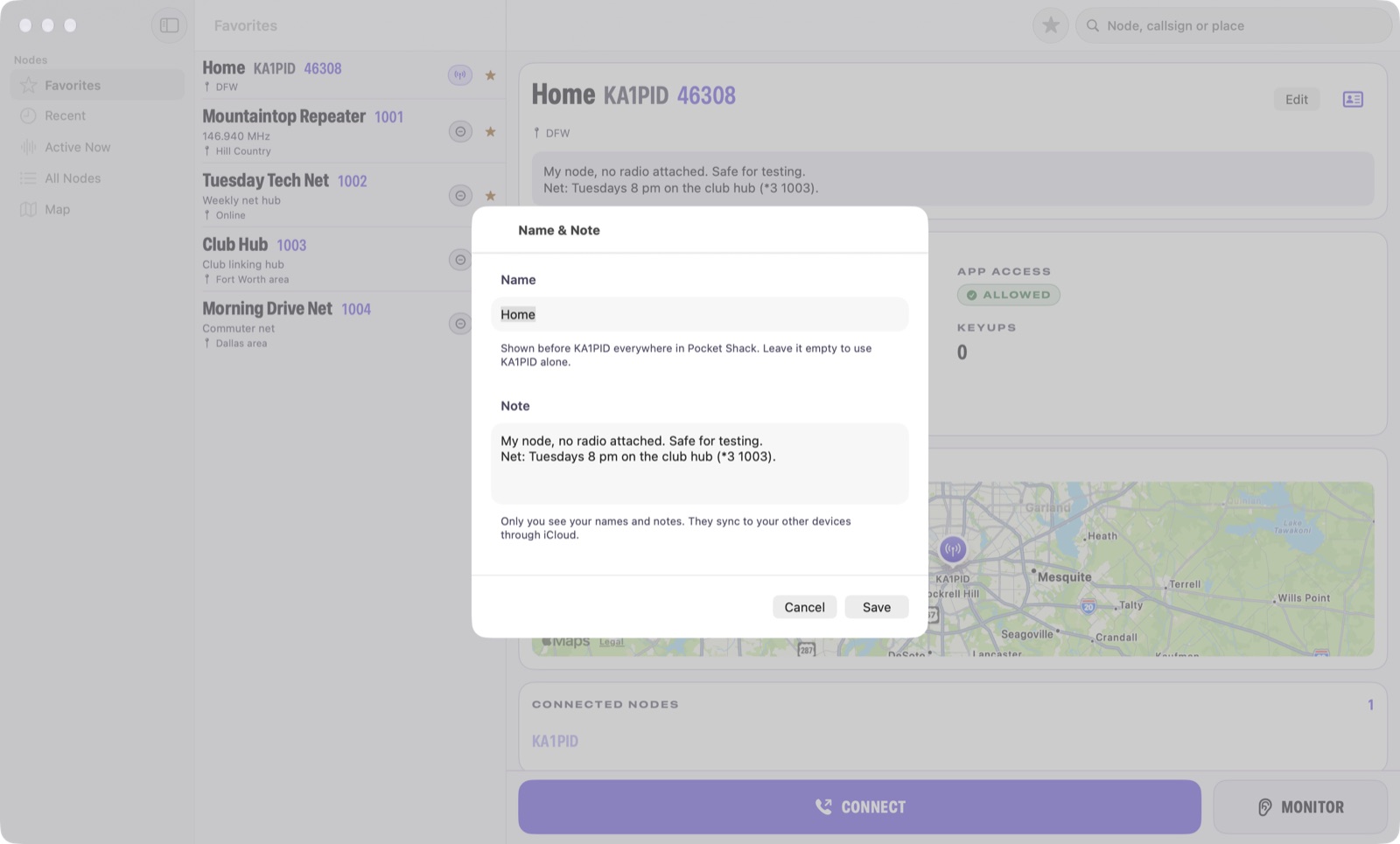
  • Node names and notes
  • Hide nodes you cannot reach
  • Callsign lookup
What these do
Node names and notes
Name any node, like “JB”, and keep a note on it, synced to all your devices.
Hide nodes you cannot reach
Optionally hide nodes that don't allow app connections, so you only see nodes you can join.
Callsign lookup
Look up any callsign in the app, with your QRZ subscription if you have one.

Everywhere you are

11 features
  • Talk from your wrist

    Hold the big Talk button, double-tap, or use the Apple Watch Ultra Action Button, with a ring counting down your transmit time.

    Pro
  • iCloud sync

    Favorites, recents and settings sync through iCloud, and your account through iCloud Keychain.

  • Live Activity and Dynamic Island

    More with Pro
  • Node status widgets

  • Listens in the background

  • A real Mac app

    More with Pro
  • CarPlayMore with Pro
  • Made for bigger screens
  • Haptic cuesMore with Pro
  • Watch complications
  • Siri and Recents
What these do
Live Activity and Dynamic Island
Live Activity and Dynamic Island with a Talk button, plus a Control Center control.
Node status widgets
Widgets for your Home Screen, Lock Screen and Mac desktop show a node's status at a glance.
Listens in the background
Keeps listening with the screen locked, over Bluetooth, and reconnects when you move between Wi-Fi and cellular.
A real Mac app
A real Mac app with a menu bar control, a global push-to-talk shortcut and your choice of microphone and speakers.
CarPlay
CarPlay with big, simple controls: favorites, nearby nodes, and Talk by tap or by voice.
Made for bigger screens
On iPad and an unfolded iPhone Duo, your nodes sit beside the node you're on, so you can browse without leaving a connection.
Haptic cues
Distinct wrist taps when the channel clears, when you're on the air, before the timeout, and if the link drops.
Watch complications
See your connection on your watch face and in the Smart Stack.
Siri and Recents
"Call node 46308 with Pocket Shack" with Siri, and connections in your phone's Recents.

Made for operators

4 features
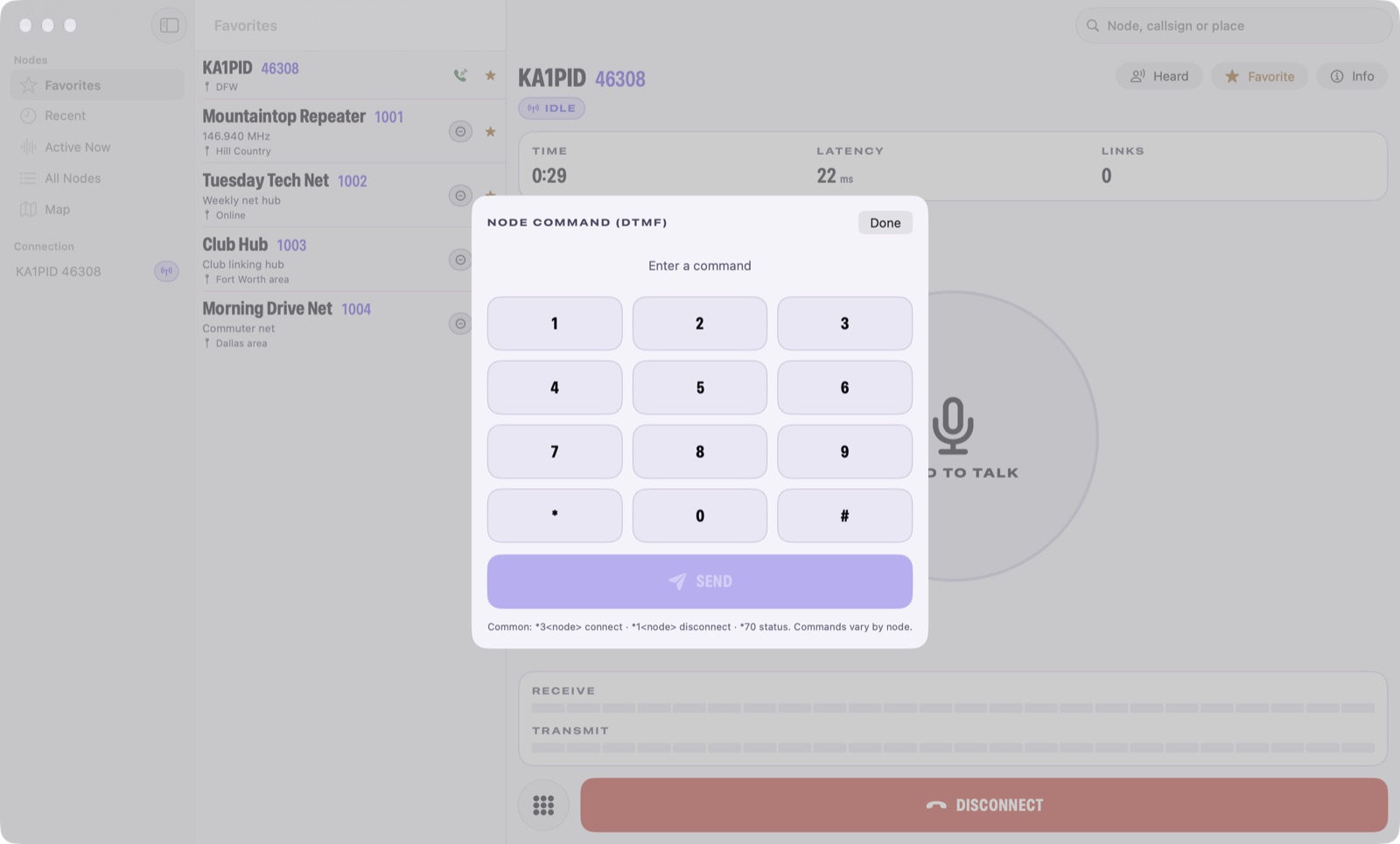
  • DTMF keypad

    A DTMF keypad for node commands.

    Pro
    Pocket Shack: DTMF keypad
  • Accessibility

    Built for VoiceOver and large text, with clear status words and symbols that never rely on color alone.

  • Private by design

    No ads, no tracking, no analytics. Your data stays on your devices and in your iCloud.

  • Night mode
What these do
Night mode
An all-red Night appearance that keeps your night vision, plus Day and Dark, or follow your system setting.

Everywhere you are

One app, on every screen you use

What each device adds.

  • iPhone

    iOS 26.1

    • Live Activity and Dynamic Island
    • Listens in the background
    • Connect to any node
    • Who is on the air
  • iPad

    iPadOS 26.1

    • Made for bigger screens
  • Mac

    macOS 26

    • A real Mac app
    • Connect to any node
    • Who is on the air
    • Node map and nearby
  • Apple Watch

    watchOS 26

    • Apple Watch remote
    • Talk from your wrist
    • Push to talk
    • Listen for free
  • CarPlay

    • CarPlay
    • Who's talking
    • Node names and notes

Private by design

No ads, no tracking, no analytics. Your data stays on your devices and in your iCloud.

Pricing

Listening is free

Listening is free. Pocket Shack Pro unlocks transmitting: $1.99 a month, $14.99 a year with a 7-day free trial, or $39.99 once. Family Sharing included.

Free

Listen to any node, on every device.

  • Connect to any node: Listen on any node
  • Who is on the air
  • Node map and nearby
  • Apple Watch remote: Listen and follow from your wrist
  • Listen for free
What each plan includes
FeatureFreePro
Connect to any nodeListen on any nodeListen and talk on any node
Apple Watch remoteListen and follow from your wristListen and talk from your wrist
Haptic cuesChannel clear and connection lost tapsPlus on-air and timeout warning taps
Live Activity and Dynamic IslandLive Activity and Dynamic IslandPlus a Talk button and Talk control
A real Mac appMac app with a menu bar controlPlus a global push-to-talk shortcut
CarPlayListen in the carPlus Talk: tap to start and stop, or Voice Activated
Push to talkNot includedIncluded
Never talk over anyoneNot includedIncluded
Talk from your wristNot includedIncluded
DTMF keypadNot includedIncluded
Transmit timerNot includedIncluded
Mic gain with a meterNot includedIncluded

Requires an AllStarLink account. AllStarLink accounts are only for licensed amateur radio operators. Pocket Shack isn't affiliated with AllStarLink, Inc.

Questions

Before you download

Do I need an amateur radio license?

Yes. Pocket Shack signs in with your AllStarLink account, and AllStarLink only issues accounts to licensed amateur radio operators. Listening is free; transmitting needs Pocket Shack Pro.

Do I need a radio or my own node?

No. Pocket Shack connects over the internet to any AllStarLink node that allows app connections.

Does it work on Apple Watch?

Run your connection from your wrist: pick a favorite, hold to talk, and see when it's busy, with your iPhone in your pocket.

Does it work with CarPlay?

Yes. CarPlay has big, simple controls: favorites, nearby nodes and listening in the car are free, and Pocket Shack Pro adds Talk, by tap or Voice Activated, switched right on the car screen.

Is Pocket Shack affiliated with AllStarLink?

No. Pocket Shack works with the AllStarLink network, but isn't affiliated with AllStarLink, Inc.

How much does it cost?

Listening is free. Pocket Shack Pro unlocks transmitting: $1.99 a month, $14.99 a year with a 7-day free trial, or $39.99 once. Family Sharing included.

Which devices does it run on?

iPhone (iOS 26.1 or later), iPad (iPadOS 26.1 or later), Mac (macOS 26 or later), Apple Watch (watchOS 26 or later), CarPlay.

What do I need?

Requires an AllStarLink account. AllStarLink accounts are only for licensed amateur radio operators. Pocket Shack isn't affiliated with AllStarLink, Inc.

What happens to my data?

No ads, no tracking, no analytics. Your data stays on your devices and in your iCloud.

Something else? Get in touch.

Pocket Shack

Ham radio push to talk

Download on the App Store